 SheetSnap
Piano reading and practice guides
Connect the page to the keys, choose the right file and start with a small phrase. These guides are currently in English.
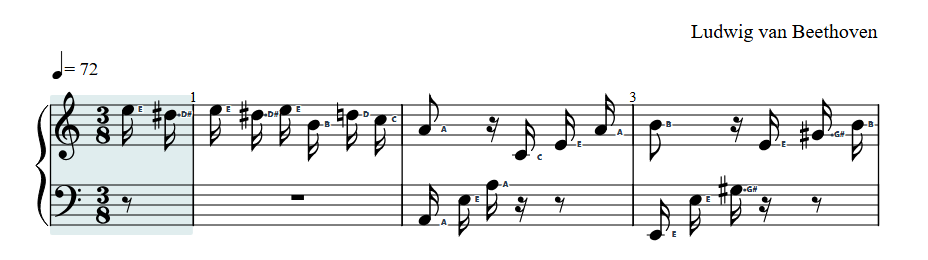
How to read piano note names on a staff
On a treble staff, the lines from bottom to top are E, G, B, D, F; the spaces are F, A, C, E. On a bass staff, the lines are G, B, D, F, A; the spaces are A, C, E, G. A note name gives pitch, not its duration.
Sharps, flats and semitones on piano
A sharp raises a written note by one semitone (the very next piano key to the right, whether black or white). A flat lowers it by one semitone (the very next key to the left). A natural cancels a sharp or flat. Count every key, not just the white keys.
Piano time signatures: 4/4, 3/8 and 6/8
A time signature tells you how a measure is organized. In 4/4, a measure holds four quarter-note units. In 3/8, it holds three eighth-note units. In 6/8, it holds six eighth-note units, normally grouped as two beats of three. It does not tell you how many noteheads must appear.
MusicXML, MIDI or PDF: which file works for piano practice?
Uncompressed MusicXML carries written notation; MIDI carries timed musical events. Both can drive interactive SheetSnap practice, but they describe different things. A PDF or photo is a picture of notation, not verified note data. Hosted photo and AI scanning are disabled in the current founding beta.
Using a MIDI piano keyboard in a web browser
A web MIDI keyboard connection needs a browser with Web MIDI support, a compatible connected device, HTTPS and your permission. Support differs from ordinary score playback. Try a free starter piece on your actual device before relying on MIDI grading or video export.
How to loop difficult piano measures in SheetSnap
Choose a short measure range, turn on Loop section, and listen at a manageable speed before expanding the passage. In SheetSnap Practice, the Start measure and End measure fields give you a precise range without dragging on the score. Repetition alone is not a check that you played the right notes.
Gradually increase piano practice speed in SheetSnap
Start with a small section and a tempo you can follow, then increase speed deliberately. SheetSnap offers manual BPM changes and Speed training that advances after completed loops or successful MIDI passes. Those are different checks: a completed playback loop says nothing about the accuracy of your playing.
From MusicXML to piano practice and a SheetSnap video
Use one score for two separate jobs: first check its notation and playback in Practice, then prepare a video of that score playback. A SheetSnap visualization is not a recording of your acoustic piano performance. Check the available access, export limits and your saved video before deciding to publish it.
How to back up piano scores and recordings in SheetSnap
Verified signed-in accounts have a private Cloud Library. SheetSnap keeps a working copy on your device and uploads versioned backups of saved scores, markings, practice history and takes. Free accounts have 25 MiB per backup; eligible Pro, Creator and beta accounts have 100 MiB. Check the successful backup date before switching devices.
Record piano playing: MIDI notes or microphone audio
Basic SheetSnap recording is free. Live MIDI records key timing, velocity and sustain-pedal events, then creates notation you can review and save as a practice piece. Microphone recording captures actual sound for listening and download; it does not automatically turn an acoustic performance into reliable note data.
A piece to begin with
Explore the first-songs progression, or read the Mary Had a Little Lamb note guide.
Compare piano practice and creator tools to choose a workflow that fits your music and device. About SheetSnap and current product facts.